Hong Kong Visa / Entry Permit
Last verified 2026-10-15 against Hong Kong Immigration DepartmentGovernment-spec dimensions, head positioning, and file constraints.
- Pixel size
- 1280 × 1600 px
- Print size
- 40 × 50 mm · 813 DPI
- Background
- white#FFFFFF
- Face height
- 64–72% · target 68%
- Eye line
- 54%–66% from bottom
- File size limit
- 5 MB
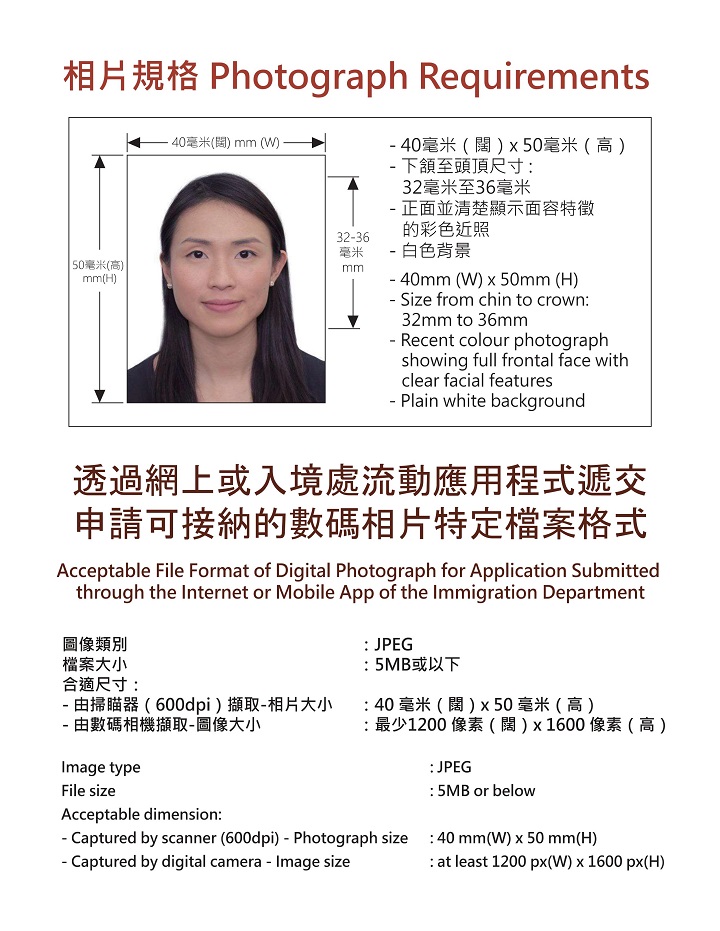
Note: Recent colour photo; white background; head 32-36 mm; JPEG up to 5 MB; follow the selected visa application instructions
Dimensions
- Print size: 40 x 50 mm, portrait orientation.
- Digital-camera submission: at least 1200 px wide and 1600 px high.
- Prepared output: 1280 x 1600 px. This meets both digital minimums while retaining the 4:5 print ratio, so a 40 x 50 mm print needs no stretching.
- File format / maximum size: JPEG, 5 MB or below.
- Scanned-photo route: the visa portal specifies a 40 x 50 mm original scanned at 600 DPI. A generated JPEG is not a scan; the prepared output follows the digital-camera dimensions.
- The visit/transit paper form ID 1003A accepts a photo from 40 x 50 mm to 45 x 55 mm (width x height). This preset uses the 40 x 50 mm size also shown in the visa portal's photo requirements.
Head position
- Head height (chin to crown): 32-36 mm in a 50 mm-high photo, or 64%-72% of the frame height.
- Face the camera directly, with the full face and clear facial features visible.
- Keep the face centred and leave space above the head.
- The eye-line guide is a framing aid; the cited visa guidance does not publish a numerical eye-line band.
Background
- Use a plain white background.
- Avoid shadows on the face or background and keep lighting even.
Expression
- Use a neutral, natural expression and look directly at the camera.
- Keep both eyes visible and the mouth closed.
Accessories
- Glasses must not have flash reflections or frames across the eyes; remove them if either occurs.
- Keep hair clear of the eyes and eyebrows.
- The portal lists head coverings among unacceptable examples. If you need a covering for religious or medical reasons, check your application's instructions or contact Immigration rather than assuming an exception.
Other rules
- Supply a recent colour photograph that clearly shows your current appearance.
- Do not staple or clip a printed photograph.
- Avoid beauty filters or changes to facial features.
- Follow any additional instructions shown for your selected application. The application authority makes the final acceptance decision.
Notes
- These requirements come from the visa portal's own page, labelled for HKSAR visa / entry permit / extension of stay applications, rather than from the passport-only travel-document page.
- ID 1003A prints dimensions height first; this guide consistently states width first.
- The prepared 1280 x 1600 px size is a choice that meets the official minimums, not an exact pixel size mandated by Immigration.
- The general GovHK upload service accepts additional document formats, but the visa photo sheet specifically requests JPEG. Use JPEG for the portrait.
- This preset does not replace the HKSAR passport preset or establish requirements for other Hong Kong identity documents.
Sources
Can I wear glasses for a Hong Kong visa photo?
The visa portal rejects flash reflections and frames across the eyes. Remove glasses if they create glare or hide your eyes.
Can I wear a head covering?
The portal lists head coverings among unacceptable examples. If you need one for religious or medical reasons, check with Immigration for your application rather than assuming an exception.
What expression should I use?
Face the camera directly with a neutral expression, mouth closed, and both eyes visible. Keep your full face centred and clearly identifiable.
How recent must the photograph be?
Supply a recent colour photo showing your current appearance. The cited visa photo sheet does not set a numerical age limit; follow any additional recency instructions for your application.
What size and format should I upload?
Use JPEG, 5 MB or below. The visa portal requires digital-camera photos at least 1200 pixels wide and 1600 pixels high. SpecSnap prepares 1280 x 1600 pixels, preserving the 40 x 50 mm print ratio.
Live validation
against the actual rulebook.
Every crop is measured against the published tolerance ranges for the selected document. Pass or warn, in real time — no "submit and hope."
The same checks the authority will run — before you submit.
- Face height & eye line measured from the pupil midpoint with sub-pixel accuracy, clamped to the tolerance range your authority publishes.
- Background colour checked across a sampled grid — catches gradients and fringe from poor segmentation (ΔE < 3 against spec).
- File-size ceiling enforced per-spec — recompressed silently for sub-60 KB e-visa portals, lossless for print.
- Sharpness & expression guards warn on blur, closed eyes, or non-neutral expressions before you export.
Process this in your browser
No install. Photos stay on your device. $2.99 per photo, watermark-free.
Open in browserShoot once. Ship anywhere around the world.
SpecSnap is free to download. Try it on the next passport renewal, visa application, or driving-licence form sitting in your inbox.