Now supporting 35 documents across 14 countries

Compliant ID photos,
without the studio.

Snap a photo. SpecSnap auto-detects your face, removes the background, and crops to the exact pixel spec required by passports, visas, and IDs across 14 countries. Validated on-device. Ready to upload or print.

100% on-device processingPixel-exact government specsFree to try
Background removed
White · 400 × 514 px
Face height 75.0%
Target 70 – 80%
89 KBUnder 300 KB cap
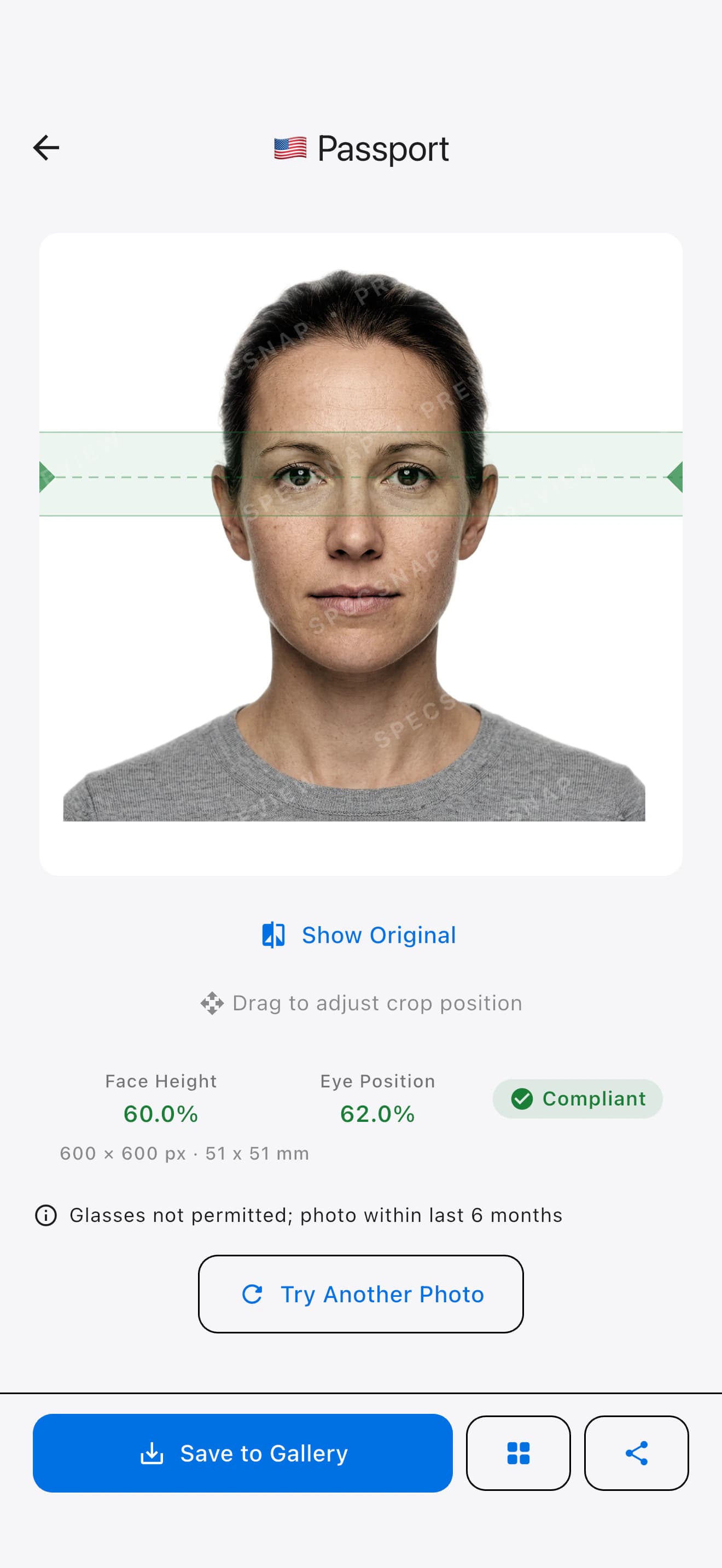
SpecSnap result screen showing a Singapore passport photo with face height, eye position, and compliance check
Supported regions
Singapore4
Malaysia5
Indonesia6
Thailand5
Philippines5
United States2
Schengen Area1
Australia1
India1
United Kingdom1
Mexico1
China1
Saudi Arabia1
United Arab Emirates1
01 — How it works

Three taps from
any selfie to submission-ready.

No passport-photo booths. No Photoshop. The whole pipeline — detection, segmentation, crop, validation, export — runs entirely on your phone in under four seconds.

STEP 01

Snap or pick a photo.

Use the in-app camera with live face-framing guides, or import any shot from your library. The app checks framing, pose, eyes, and blur before you export.

Before
After
STEP 02

We auto-correct the frame.

Face detection locates your eyes, head, and chin. Background segmentation cleans to white — or the specific red, blue, or grey your document requires.

Compliant
STEP 03

Export to exact spec.

Save a digital copy for online portals, generate a 4×6-print layout with crop marks, or come back later from local history to re-export or delete a shot.


02 — Specifications

Every spec. Every tolerance.
Audited and kept current.

SpecSnap ships with the exact dimensions, face-height ratios, eye-line positions, file-size caps, and background colour requirements for 35 document types. Swap between them in one tap — the photo revalidates live.

Passport / IC

400 × 514 px · 35 × 45 mm
Face 70–80% · 8 MB
PassportIC

Visa

400 × 514 px · 35 × 45 mm
Face 70–80% · 60 KB
VisaStrict size

Work Pass

400 × 514 px · 35 × 45 mm
Face 70–80% · 8 MB
Work pass

Driving Licence

400 × 514 px · 35 × 45 mm
Face 70–80% · 8 MB
Licence

Passport (Print)

827 × 1181 px · 35 × 50 mm
Face 70–80% · 300 KB
PassportPrint

Passport (IMI Portal)

827 × 1181 px · 35 × 50 mm
Face 70–80% · 300 KB
PassportDigitalBlue bg

Visa

827 × 1181 px · 35 × 50 mm
Face 70–80% · 100 KB
Visa

Employment Pass

827 × 1181 px · 35 × 50 mm
Face 70–80% · 300 KB
Work pass

Driving Licence

295 × 378 px · 25 × 32 mm
Face 70–80% ·
Licence

Passport

600 × 600 px · 51 × 51 mm
Face 70–80% · 240 KB
PassportRed bgNo glasses

e-Visa / e-VoA

400 × 600 px · 40 × 60 mm
Face 50–60% · 2 MB
e-VisaNo glasses

Visa (35×45 mm)

413 × 531 px · 35 × 45 mm
Face 70–80% ·
Visa

Visa (4×6 cm Red)

472 × 709 px · 40 × 60 mm
Face 70–80% ·
VisaRed bg

KTP (Odd birth year)

354 × 472 px · 30 × 40 mm
Face 70–80% ·
KTPRed bg

KTP (Even birth year)

354 × 472 px · 30 × 40 mm
Face 70–80% ·
KTPBlue bg

Passport

413 × 531 px · 35 × 45 mm
Face 70–80% · 120 KB
Passport

Visa

413 × 531 px · 35 × 45 mm
Face 70–80% · 120 KB
Visa

Visa on Arrival

472 × 709 px · 40 × 60 mm
Face 70–80% · 120 KB
VoA

e-Visa (Digital)

132 × 170 px · 5.6 × 7.2 mm
Face 70–80% · 60 KB
e-VisaGrey bg

Work Permit

354 × 472 px · 30 × 40 mm
Face 70–80% ·
Work permitBusiness attire

Passport

413 × 531 px · 35 × 45 mm
Face 70–80% ·
PassportRoyal blue bg

Visa (35×45 mm)

413 × 531 px · 35 × 45 mm
Face 70–80% ·
VisaNo glasses

General ID (2×2 in)

600 × 600 px · 51 × 51 mm
Face 50–69% · 240 KB
SSSPhilHealthGSIS

NBI Clearance

600 × 600 px · 51 × 51 mm
Face 50–69% · 240 KB
NBINo glasses

PRC License (1×1 in)

295 × 295 px · 25 × 25 mm
Face 60–70% ·
PRC

Passport

600 × 600 px · 51 × 51 mm
Face 50–69% · 10 MB
PassportNo glasses

Visa (DS-160)

600 × 600 px · 51 × 51 mm
Face 50–69% · 240 KB
VisaDS-160

Visa

413 × 531 px · 35 × 45 mm
Face 71–80% · 240 KB
VisaICAO

Passport

413 × 531 px · 35 × 45 mm
Face 71–80% · 2 MB

Passport

630 × 810 px · 35 × 45 mm
Face 80–85% · 250 KB

Passport

600 × 771 px · 35 × 45 mm
Face 64–76% · 10 MB

Visa (2x2 inch)

600 × 600 px · 51 × 51 mm
Face 50–69% · 2 MB

Visa

354 × 472 px · 354 × 472 p ×
Face 70–80% · 120 KB

eVisa

200 × 200 px · 200 × 200 p ×
Face 70–80% · 100 KB

Visa

508 × 650 px · 43 × 55 mm
Face 70–80% · 600 KB
03 — Compliance engine

Live validation
against the actual rulebook.

Every crop is measured against the published tolerance ranges for the selected document. Pass or warn, in real time — no "submit and hope."

VALIDATOR · SG_PASSPORTALL CHECKS PASS
Dimensions
target 400 × 514 px
exact
400×514
Face height
70% – 80%
target 75%
75.0%
Eye line
50% – 60% from bottom
target 55%
55.2%
Background
plain white
ΔE < 3
#FFFFFF
File size
max 8 MB
JPEG q=92
182 KB
Sharpness
no motion blur
Laplacian var
1,284

The same checks the authority will run — before you submit.

  • Face height & eye line measured from the pupil midpoint with sub-pixel accuracy, clamped to the tolerance range your authority publishes.
  • Background colour checked across a sampled grid — catches gradients and fringe from poor segmentation (ΔE < 3 against spec).
  • File-size ceiling enforced per-spec — recompressed silently for sub-60 KB e-visa portals, lossless for print.
  • Sharpness & expression guards warn on blur, closed eyes, or non-neutral expressions before you export.
04 — Privacy by default

Your face never leaves
your phone.

SpecSnap runs face detection and background removal locally using on-device ML. No upload. No account required. No server copies. The only network call the app makes is for in-app purchases.

On-device processing

Face detection, background segmentation, and compliance checks all run locally. Nothing about your photo is transmitted.

No account, no email

Open and shoot. SpecSnap doesn't make you sign up. Your local history stays on your device, so you can revisit, re-export, or delete past photos anytime.

Free to download

SpecSnap is free to download and try every spec — no sign-up, no subscription. The preview is watermarked; a clean, watermark-free photo is a one-time in-app purchase per shot on iPhone and Android.

0
Server uploads

Your image bytes are processed entirely on your device's secure enclave and neural engine.

<4s
End-to-end

From shutter to compliant export on a typical phone from the last four years.

35
Document specs

Passports, visas, driving licences, work passes, and national IDs across 14 countries.

11
Languages

English, Bahasa Melayu, Bahasa Indonesia, ไทย, 简体中文, Español, Deutsch, Français — switch on the fly.

05 — Questions

Before you download.

Will my photo actually be accepted by the authority?
SpecSnap enforces every published dimensional requirement — output resolution, face height, eye line, background colour, and file size — for each document. The remaining variables (focus, expression, lighting) are surfaced as warnings before you export, so you can fix them or reshoot. Where an authority publishes an exact file-size cap (e.g. 60 KB for Singapore visa, 300 KB for Malaysia passport, 240 KB for Indonesia passport), we recompress to hit it while preserving colour fidelity.
Which documents are supported today?
Singapore — Passport/IC, Visa, Work Pass, Driving Licence. Malaysia — Passport (Print & IMI Portal), Visa, Employment Pass, Driving Licence. Indonesia — Passport, e-Visa/e-VoA, Visa (35×45 & 4×6 red), KTP odd- and even-birth-year. Thailand — Passport, Visa, Visa-on-Arrival, e-Visa digital, Work Permit. Philippines — Passport, Visa, General 2×2, NBI Clearance, PRC License. United States — Passport, Visa (DS-160). Schengen — Visa. 35 in total. More country packs ship in future updates — free for everyone.
Does SpecSnap upload my photo anywhere?
No. Face detection and background removal use on-device ML models bundled with the app. Your photo, the extracted face landmarks, and the final crop all stay in app-local storage. The only network calls the app makes are to fetch optional app updates — the photo pipeline itself is 100% local.
Can I use ChatGPT or Gemini to generate my passport photo?
We don't recommend it, and most authorities won't accept it. AI image generators redraw your face — they don't preserve the actual person in the photo. Passport, visa, and ID guidance from ICAO and a growing list of national authorities (including the US, effective 2026) explicitly rejects AI-generated or AI-edited photos for this reason. Generative models also can't reliably honor the exact specifications each document requires — face-height ratios, eye-line positions, background colours, output dimensions, or file-size caps. SpecSnap doesn't generate your face. It detects, removes the background, composites the spec-required colour, and crops to the official ratios — entirely on your device, never uploaded.
What phones does it run on?
SpecSnap is available on iPhone with iOS 15.5 or later, and on Android via Google Play. On supported devices, processing typically takes 2–4s, with older hardware taking a bit longer. All processing is on-device.
How much does SpecSnap cost?
SpecSnap is free to download and try every spec. The on-screen preview is watermarked; to save or share a clean, watermark-free photo, pay a one-time in-app purchase per shot on iPhone or Android. No subscription, no sign-up.

Shoot once. Ship anywhere around the world.

SpecSnap is free to download. Try it on the next passport renewal, visa application, or driving-licence form sitting in your inbox.